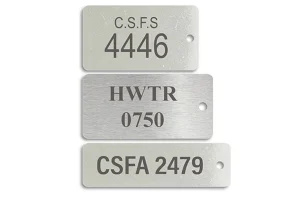
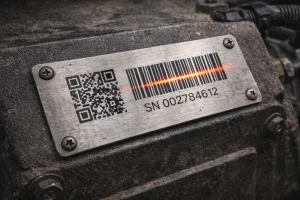
Do not send only a spreadsheet and assume the data is ready. Each row must map to the right label, the visible number must match the encoded barcode or QR content, and the final labels must stay connected to the agreed delivery order.
Excel or CSV is only the container. The manufacturing decision depends on the data rules inside it: which characters must remain, which numbers are intentionally skipped, which records are valid, and which file is the approved version.

1. Define What Each Data Row Represents
Start by defining one row before checking its format.
For each row, state:
- Which equipment, product, or label the row represents.
- What text must appear on the label.
- What content the barcode or QR code must encode.
- Which parts stay fixed and which parts change from label to label.
This link between the row, the visible label content, and the encoded data is the first control point. A file can open normally and still leave the production meaning unclear.
2. Preserve Characters and Explain Exceptions
Treat serial numbers as customer-defined identifiers, not ordinary numbers.
Leading Zeros and Letter Prefixes
000123 and 123 may represent different identifiers. Keep leading zeros when they are part of the approved number. The same applies to letter prefixes, separators, and other characters that belong to the identifier rule.
Before production, state which characters must appear as visible text and which characters must be included in the barcode or QR code.
Planned Gaps
Serial numbers do not always run without gaps. If certain numbers are intentionally skipped, mark that rule and provide the final valid list. The manufacturer should not fill in missing numbers based on assumption.
Duplicate Numbers
Do not delete a duplicate automatically. Ask the customer to confirm whether the duplicate is intentional or came from data preparation. Keep the original record available until the decision is clear.
Cancelled or Invalid Records
Separate records that should not be produced from the valid production list. A cancelled identifier, a rejected label, and a valid label are different records and should not be mixed in one undifferentiated list.
3. Match Data, Artwork, and Encoded Content
Check the data file against the label Artwork before sampling or production.
Confirm these points:
- The data file and Artwork refer to the same product and revision.
- The visible serial number matches the intended row.
- The barcode or QR code contains the approved content.
- Fixed text, variable text, and code positions match the Artwork.
- A revised data file has a clear version reference and replaces the earlier file.
A correct file extension does not prove that the label content is correct. The data, Artwork, visible marking, and encoded content must be checked as one chain.

4. Confirm Production and Delivery Requirements Early
Sampling, production, and packing should all use the same customer-confirmed data version.
Tell the manufacturing team before quotation or sampling if the order requires:
- Labels packed in serial order.
- Separate batches for different equipment groups.
- Labels matched to equipment or unit numbers.
- A specified scanner or reading condition.
- A defined packing label or delivery sequence.
These requirements apply only when they are agreed for the project. If your project includes scanning, inspection, replacement handling, cancelled-label separation, or complex batching, confirm the exact method and responsibility before production.

5. What to Send for a Data Review
Send the information you already have, with the unresolved points marked clearly:
- The valid serial number or barcode data list.
- Rules for leading zeros, letter prefixes, planned gaps, duplicates, and cancelled records.
- The approved data version for sampling or production.
- Artwork showing fixed content, variable fields, and code locations.
- Any equipment matching, packing sequence, batch separation, or scanning requirements.
Himgo can review whether the information is complete, identify data points that need customer confirmation, check variable content against the Artwork, and discuss the manufacturing route for the labels. The customer remains responsible for confirming which identifiers are valid and which data version is approved.
Continue Your Project Review
For the product context, see serialized and barcode metal labels. You can also review our manufacturing capabilities and how we work before submitting your project.
Ready to review your serial number or barcode data? Request a project review and quote with your data list, Artwork, version reference, and delivery requirements.
Request a Project Review Contact Engineering